Every marketer has faced the same problem: people are interested, but they do not act right away.
They open the email, visit the landing page, browse the offer, and think, “I’ll come back later.” In many cases, later never happens.
That is why deadlines matter. A clear deadline gives people a reason to make a decision now instead of postponing it. One of the simplest ways to make that deadline visible is by using a countdown timer.
A countdown timer is not just a design element. When used honestly, it helps communicate urgency, improves clarity, and makes time-sensitive campaigns easier to understand.

Why Countdown Timers Work
Countdown timers work because they make time visible.
A line of text like “Offer ends soon” is easy to ignore. A live timer showing days, hours, minutes, and seconds is much harder to miss. It helps users instantly understand that the campaign has a real endpoint.
This is useful for:
- Flash sales
- Product launches
- Webinar registrations
- Event promotions
- Holiday campaigns
- Limited-time discounts
- Cart recovery emails
- Free trial or bonus deadlines
The key is that the urgency should be real. A countdown timer should support a genuine deadline, not create fake pressure. When the timer matches the actual offer, it builds trust and helps customers make faster decisions.
Email Countdown Timers
Email marketing is one of the best places to use countdown timers.
In a crowded inbox, marketers need to communicate quickly. An email countdown timer can show subscribers exactly how much time they have left to claim an offer, register for an event, or take advantage of launch pricing.
For example, instead of writing:
Sale ends Friday.
You can show a live countdown timer that counts down to Friday’s deadline.
This makes the message clearer and more visual. It can also improve click-through rates because the reader sees the deadline before clicking the call-to-action button.
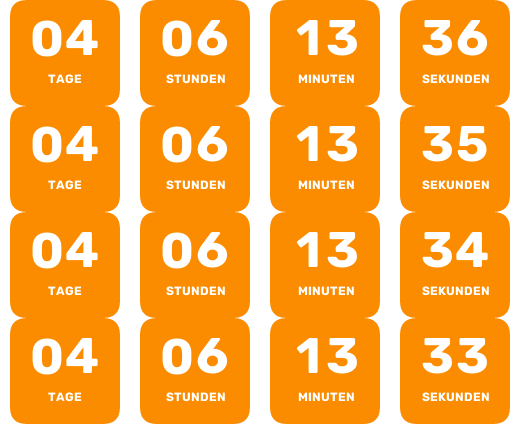
A good placement is near the main CTA, such as:
- Under the headline
- Above the CTA button
- Below the offer details
- Inside last-chance reminder emails
The timer should support the offer, not distract from it. The best-performing emails usually keep one main offer, one main deadline, and one main call to action.
Website Countdown Timers
Countdown timers are also useful on websites and landing pages.
A website countdown timer can be used on:
- Sales pages
- Checkout pages
- Product launch pages
- Webinar registration pages
- Event pages
- Coming soon pages
- Seasonal campaign pages
When visitors land on a page, the timer immediately tells them that the offer is time-sensitive. This can reduce hesitation and make the next step more obvious.
For example, an ecommerce brand can use a countdown timer during a weekend sale. A SaaS company can use one for annual plan discounts. A course creator can use one before enrollment closes.
The goal is not to pressure every visitor. The goal is to make the deadline easy to understand.
Evergreen Countdown Timers for Automation
Not every campaign has a fixed deadline.
Some campaigns run automatically, such as welcome sequences, onboarding emails, abandoned cart flows, or free trial campaigns. In these cases, an evergreen countdown timer can be more useful than a fixed-date timer.
An evergreen timer starts based on each individual subscriber’s action, such as when they first open an email. For example, every new subscriber may receive a 48-hour bonus window, even if they join your list weeks apart.
This creates personalized urgency without manually updating campaign dates.
Evergreen countdown timers are especially useful for:
- Welcome email sequences
- Automated discount campaigns
- Lead magnet follow-ups
- Trial expiration reminders
- Abandoned cart recovery
- Limited-time onboarding bonuses
They help marketers build scalable campaigns that still feel timely to every subscriber.
What to Look for in a Countdown Timer Builder
A good countdown timer builder should be easy to use and flexible enough to match your brand.
Useful features include:
- Email and website timer support
- Real-time countdown updates
- Premade templates
- Custom colors and fonts
- Custom timer labels
- Localization options
- Transparent backgrounds
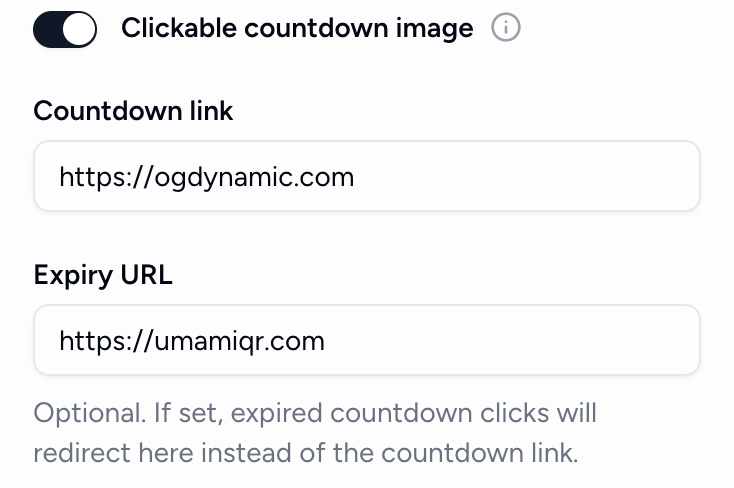
- Clickable countdown images
- Custom expiry states
- Evergreen timer support
- Simple embed code
- Basic performance tracking
For example, Countdown Builder lets marketers create countdown timers for emails and websites without coding. Users can choose from professional templates, customize the design, copy a simple embed code, and place the timer inside email platforms or websites.
It also supports advanced options such as evergreen timers, custom labels, clickable countdown images, expiry settings, background images, and open tracking.
Best Practices for Using Countdown Timers
Countdown timers work best when they are used with a clear strategy.
First, use real deadlines. If the offer ends at midnight, the timer should count down to midnight. Fake urgency can damage trust.
Second, place the timer close to the offer and CTA. If the timer is too far away from the action, users may not connect the deadline with the next step.
Third, keep the design consistent. The timer should match your brand colors, typography, and email or website layout.
Fourth, use clear copy around the timer. A timer alone is not enough. Explain what ends when the countdown reaches zero.
For example:
Launch pricing ends when the timer hits zero.
Or:
Register before the countdown ends to reserve your seat.
Finally, test your campaigns. Try different placements, subject lines, CTA copy, and timer designs to see what works best for your audience.
Final Thoughts
Countdown timers are simple, but they can make campaigns much clearer.
They help users understand when an offer ends, why they should act now, and what step they should take next. Whether you are running an email campaign, launching a product, promoting an event, or building an automated sales funnel, countdown timers can add useful urgency without complicating the customer experience.
Used honestly, a countdown timer is not a gimmick. It is a clear visual reminder that time matters.
For marketers who want to create email and website countdown timers quickly, Countdown Builder provides an easy way to design, customize, and embed timers without coding.
